Editing a piece
Everything on a piece is a thing you can pick up and move. This page covers the canvas, the list of layers on the left, the choices on the right, and asking Elle for a change instead.
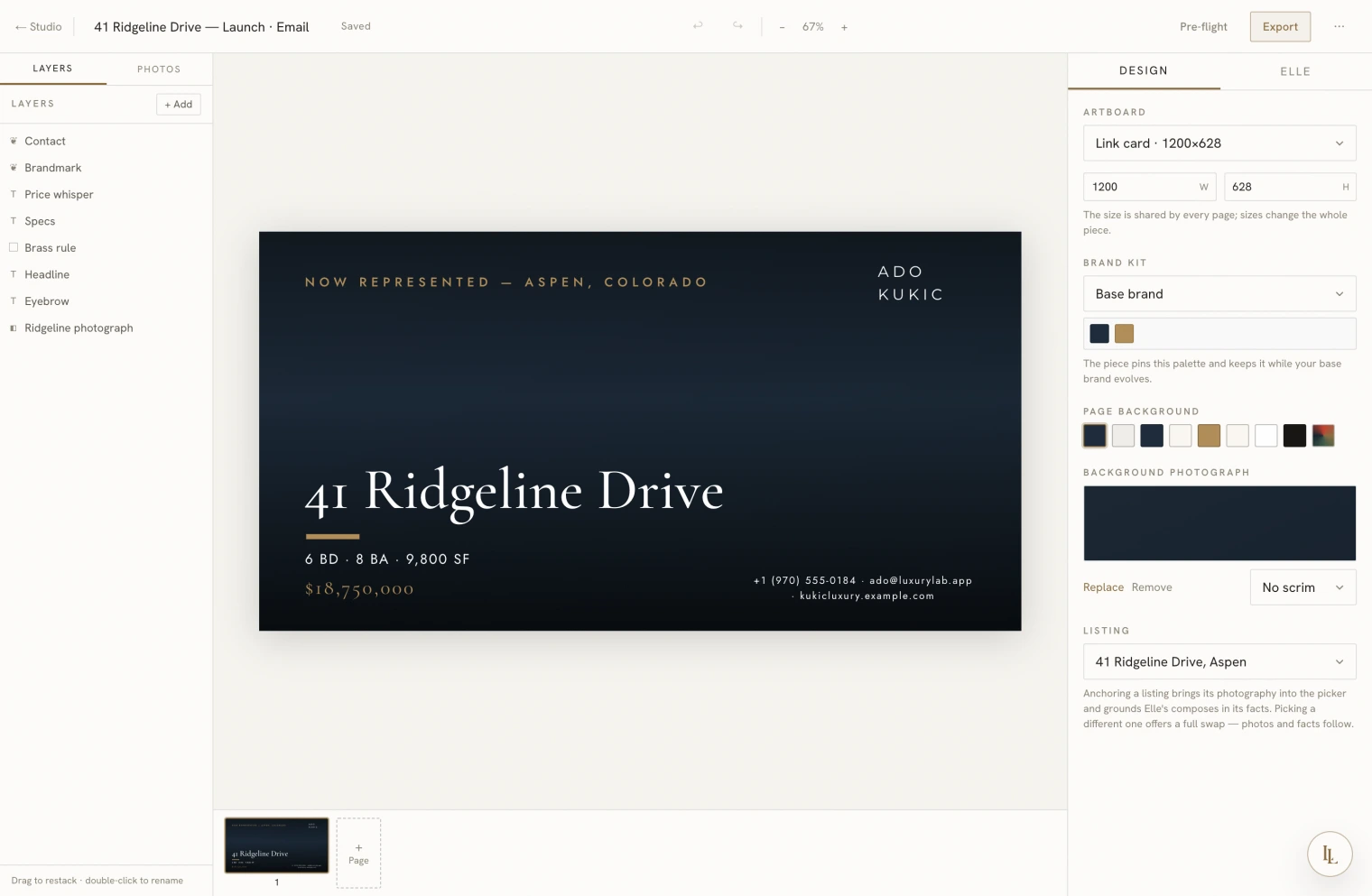
Moving things around
Click anything on the canvas to select it. Then:
- Drag to move it. Drag a corner to resize.
- Arrow keys nudge by one step; hold Shift for ten.
- Double-click text to type into it.
- ⌘C and ⌘V copy and paste — including between pieces, so a headline you like can travel.
- ⌘Z undoes. Every change is undoable, including the ones Elle makes.
Select several things at once and a row of alignment controls appears — align their left edges, centre them on each other, space them evenly, or line them up against the edge of the piece itself. It is quicker and straighter than doing it by eye.
The layers list
Everything on the piece, top to bottom, on the left. Use it to:
- Find something you cannot click — a shape sitting behind a photograph.
- Restack — drag a layer up or down to change what sits in front.
- Hide something without deleting it.
- Lock something so you stop moving it by accident.
The Photos tab beside it holds your pictures. Drag one straight onto the canvas — drop it on an empty frame and it fills the frame.
Adding things
Add offers text, a rectangle, an ellipse, a rule, a photograph, a QR code, your brand mark, your contact line, and your compliance line.
Two of those are worth knowing about:
QR code. Choose what it should point to — this property’s page, your website, or a web address you type. When someone scans it, they land on the right page and the scan is counted. See Print and mail.
Compliance line. Your brokerage name, your licence number, and the equal housing mark, drawn live from your brand. Change your licence number in Brand and every piece carrying this line is already correct.
The choices on the right
| Choice | What it does |
|---|---|
| Artboard | The size of the piece. Changing it changes every page. |
| Brand kit | Which palette this piece wears. Pinned, so it keeps that look even if your base brand changes later. |
| Page background | The colour behind everything, or a photograph. |
| Listing | Which property this piece is about. |
Select something and the panel changes to that thing’s own choices — its typeface and size for text, its colour and opacity for a shape, its framing and scrim for a photograph.
Colours
Colours are named rather than typed: primary, accent, brand, and so on. That is what lets a piece follow your brand — and it is why the app can keep type readable on whatever ground you put it on. A hand-typed colour is available when you need it.
Text that reads itself from the property
A text layer can be bound to a fact — the price, the address, the city and state, or the specifications. Bound text shows what the property actually says right now. Correct a price on the listing and every piece carrying it is correct too, with nothing to remember.
Photographs
A photograph in a frame has:
- Framing — fill the frame or fit inside it, plus a zoom and a focal point so you decide which part of the picture survives the crop.
- Scrim — a darkening behind the type, in four strengths, plus an edge scrim for type anchored to a corner and a veil for type in the middle. If a headline is hard to read, try a different scrim before you try a different photograph.
- Remove the background — cuts a subject out of its surroundings.
Pages
A piece can have more than one page: a two-sided card, a four-page guide, or the scenes of a film. The strip along the bottom adds, reorders, renames and deletes them. Every page is the same size.
Asking Elle instead
The Elle tab on the right takes a note in plain words:
Make the headline bigger and drop the phone number.
Try it with the terrace photograph, and move the price down to the corner.
She changes the piece in place. You can undo it like anything else.
Two shortcuts sit beside her:
- A different structure and the tone controls — bolder, more drama or quieter, more negative space — offer you a few alternative versions side by side. Pick one or keep what you have. You can point the request at just the part you have selected.
- Every size re-sets the piece into other sizes — a post into a story, a flyer into a postcard — as new pieces, leaving this one alone.
Before it ships
Pre-flight is the last look. It checks the things that are easy to miss — type too small to read in print, something hanging off the edge, a photograph too low-resolution for the size it is printed at, a colour pairing that will be hard to read — and adds one written note about the design itself.
It is advice, not a gate. Nothing stops you exporting.
Saving your own starting point
Save as a starter puts a copy of the piece on your own shelf on the Studio page. The shelf copy is frozen: using it opens a fresh copy, so you cannot wear out the original by accident.
What saves
Everything, as you go. The header says Saved. There is no save button.
Getting it out
Export gives you a PNG at the size you chose. For paper, PDF — for print gives you a print-ready file. See Print and mail.