Transaction dates
Earnest money, inspection, appraisal, financing, walkthrough, closing — each one a task with a date on it, in the same list as everything else you have to do.
A step in a transaction is a task. There is no separate calendar to keep in step: the inspection date is a task called Inspection, due on that day, filed under this deal. It shows up on your task list, in your morning briefing, and on the deal.
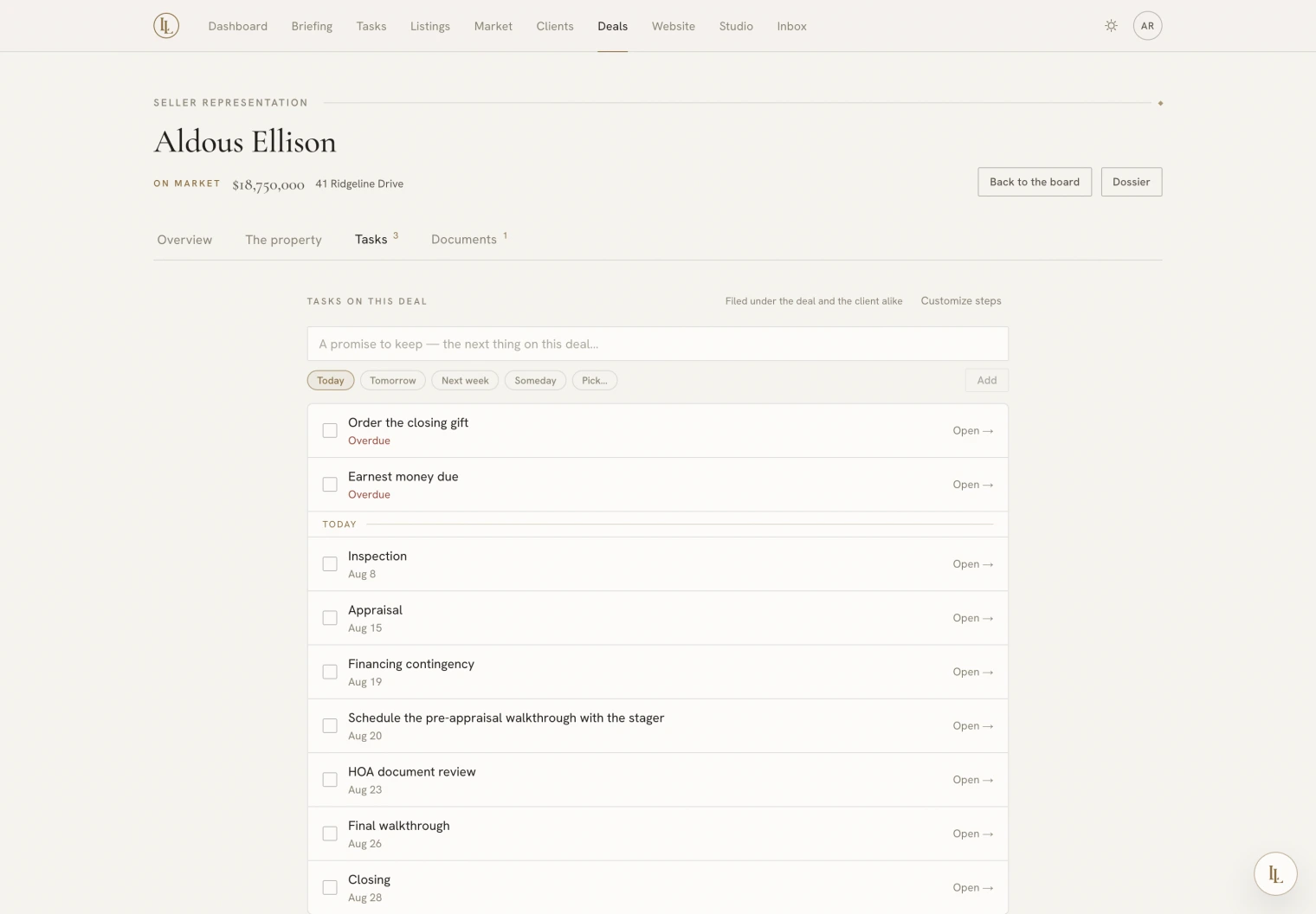
Setting the dates
Three ways, all the same thing:
- On the deal’s Tasks tab, type a date against a step.
- On the client’s file.
- By telling Elle:
Inspection is the 12th, appraisal the 18th, closing the 30th.
If you only know the closing date, seed the timeline from it and the rest are placed at sensible offsets for you to correct.
A playbook step can be anchored to a date — two days before inspection. Until the date exists, those steps wait. Setting the dates is what unrolls the whole under-contract checklist, which is why the Under contract playbook’s first task is to capture them.
Re-dating a step clears its tick. A date that moved is a commitment that has not been kept yet.
The standard steps
| Step | Usually |
|---|---|
| Earnest money | Days after acceptance |
| Inspection | The first real deadline |
| Appraisal | After inspection clears |
| Financing contingency | The lender’s date |
| Final walkthrough | Day before closing |
| Closing | The one everybody has in their diary |
Add a date puts anything else on the list — a survey, an HOA document review, a stager’s walkthrough. Custom steps can repeat as often as you like.
Making the list your own
Customize steps on the Tasks tab edits the list your deals start from — separately for buyer and seller work. Rename what you call things, drop what your market does not do, add what it does.
Saving replaces the list, so read it before you save. Clearing it entirely puts you back on the standard steps.
Editing the list does not disturb deals already running. Re-seed a deal after an edit and only the steps it is missing are added.
Overdue dates get louder, not quieter
A step whose date has passed keeps appearing — on the deal card, on the board, in your morning briefing, with the date it was due. A blown date is exactly what you need to see, so nothing is hidden once it goes red.
On your calendar
With Google Calendar connected, each dated step appears as an all-day event, and moving the date moves the event. Ticking a step off or deleting it removes it. See Integrations.
Asking Elle
What’s the timeline on the Ellison deal?
Inspection moved to the 14th.
The appraisal is done.