The dossier
One client, five tabs, and a band across the top telling you exactly where things stand.
Click anyone in the book. What opens is a cockpit, not a form.
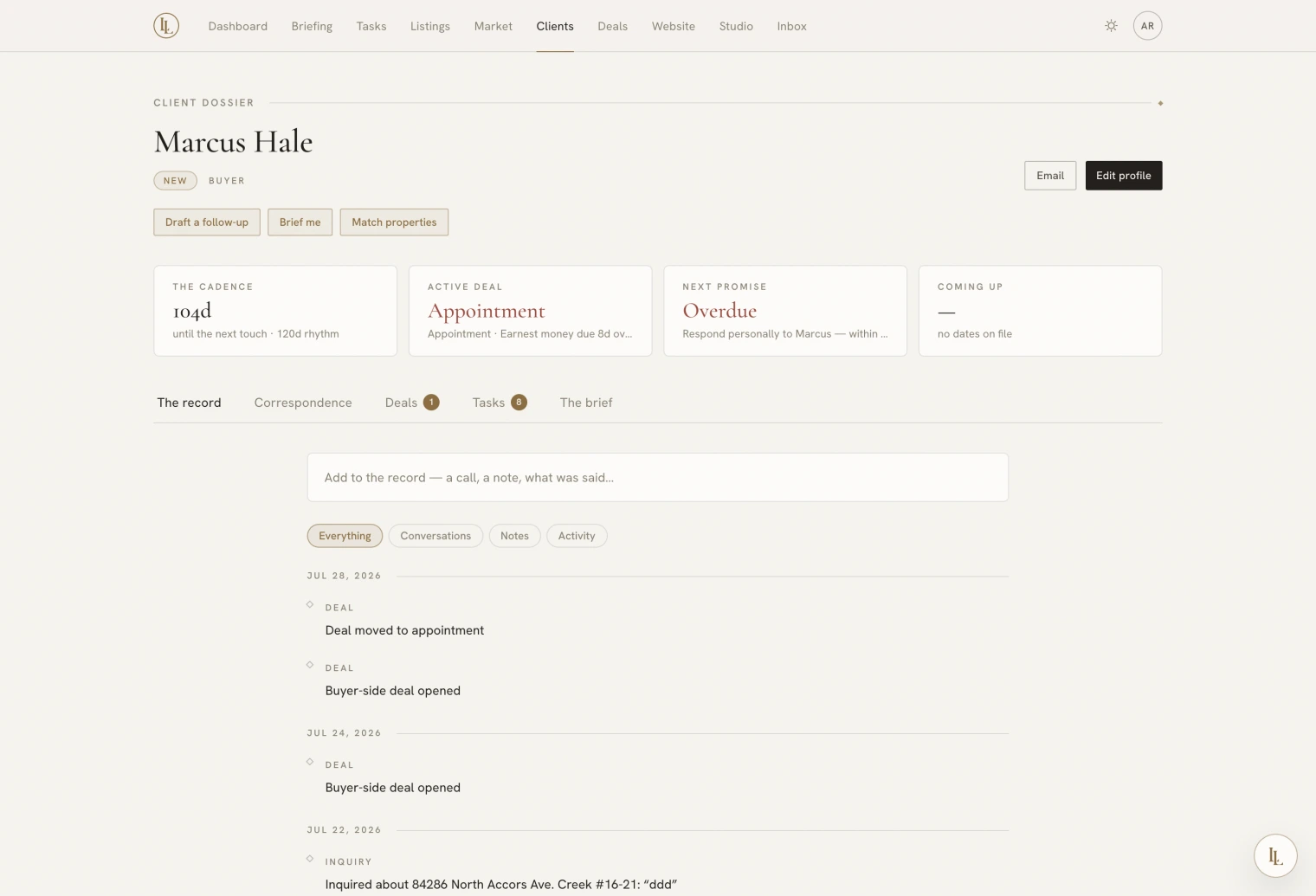
The pulse band
Four tiles across the top answer “where are we with this person?” before you read anything.
| Tile | Tells you |
|---|---|
| Cadence | Overdue by how long, or days until the next touch is due. “At rest” for people not on a rhythm |
| Active deal | Price and the next milestone. Clicking it opens the deal |
| Next promise | The earliest open task. If there is none, it nudges you to jot one |
| Coming up | Birthday or home anniversary within two months |
The five tabs
Tabs keep their state as you move between them — a half-written reply is still there when you come back.
The record
Your full history with this person, newest first, grouped by day — Today, Yesterday, then dates. A small marker on each entry tells you the type at a glance: a filled diamond for conversations, a hollow one for notes, a plain line for activity the app recorded itself.
Filter to Everything, Conversations, Notes, or Activity.
The box at the top is one line until you click it. Pick the type — call, email, text, meeting — write what happened, and save. Happened earlier? lets you backdate it. ⌘↵ saves.
Correspondence
The actual email thread with this person: their messages on the left, yours on the right, quoted tails collapsed.
You cannot send from here — the footer offers Draft with Elle, which stages a reply, and a link to open the full conversation where the send button is. The dossier deliberately does not mark the thread read, so glancing at someone’s file does not clear your inbox.
Import email history brings years of Gmail correspondence with this person into the record, with their real dates. It only runs when you press it. See Inbox.
Deals
Their deals as cards, each with its milestone meter — a diamond per transaction date, filled as they are kept, red when one is overdue — and a line reading “three of six kept · next: appraisal in four days”. Opening one takes you to the deal page, where the work happens.
Beneath, In their range: listings that fit their brief, each with a Pitch it chip that hands the pairing to Elle.
Follow-ups
Their open tasks, and their nurture enrollment if they are on one. Task rows carry due chips — Today, Tomorrow, Next week, Someday — and a one-click Tomorrow.
The brief
What you know and what they want, edited in place:
- Stage and tier
- Follow-up override — leave blank to use the tier default
- Price band —
$5mshorthand works - Markets — the neighbourhoods or cities they are looking in
- Timing and what they are actually after — the sentences that do not fit in a field. Agent-facing, and separate from your private notes.
- Tags
- Private notes
A line underneath tells you the consequence: how many current listings match what you have entered.
The same brief is editable on their buyer deal, under The search, where Draft from the record will write the narrative half for you from what the file already says. It extracts; it never invents a preference, and it never saves without you.
The notes field, and anything you log as a note rather than a conversation, is excluded from every draft Elle writes to a client. Your candid assessment of someone cannot end up in an email to them.
Full identity fields — name, addresses, all the reach details — live on the separate Edit page. The brief tab holds what you actually change often.
Quick actions
The header carries call, email, and text shortcuts, and chips that hand the whole file to Elle: Draft a follow-up, Brief me, Match properties.
Archiving
Archiving takes someone out of the book and off every rail without deleting the history. If they come back — a new enquiry from the same address — the record revives with everything intact.